Mobile CBCT at your clinic — $289·Book now

MYNAVI CBCT VIEWER · IN YOUR BROWSER · 100% FREE

OPEN YOUR CBCT SCAN RIGHT IN YOUR BROWSER.

Our free CBCT / DICOM viewer runs entirely in your browser — MPR, 3D, panoramic view and implant planning. No installation, and your scan never leaves your computer.

Works in Chrome, Edge and other modern browsers.

Opens in your browser

No download, no install, no license, no account. Click the button, drop your DICOM ZIP — the scan opens in seconds on Windows, macOS or Linux.

Your scan never leaves your computer

Everything is rendered locally in the browser. Nothing is uploaded to any server — the study stays on your device, start to finish.

Full clinical views

MPR (axial / coronal / sagittal), 3D volume with bone and X-ray modes, automatic panoramic view and a Custom Pano workspace with cross-sections.

Implant planning & measurements

Place implants in two clicks, drag and rotate them on any slice or in 3D, measure distances in true millimetres — calibrated scale, no setup.

For professional review only — not a diagnostic device. The viewer renders images locally in your browser; no patient data is uploaded or stored on any server.

A full CBCT / DICOM viewer that runs in your browser.

The MyNavi CBCT viewer opens your cone-beam CT scan directly in the browser — no download, no installation and no account. Drop in a DICOM folder or the delivered .zip and the full 3D volume loads in seconds. Everything is rendered locally on your own computer, so the scan never leaves your device and nothing is uploaded to a server.

Review the study with multiplanar reconstruction (axial, coronal and sagittal slices), a 3D volume render with bone and x-ray modes, an automatic panoramic (OPG) view, and a Custom Pano workspace. Plan dental implants in true millimetres, place and rotate them on any slice or in 3D, and measure distances on a calibrated scale — all free, right here in your browser.
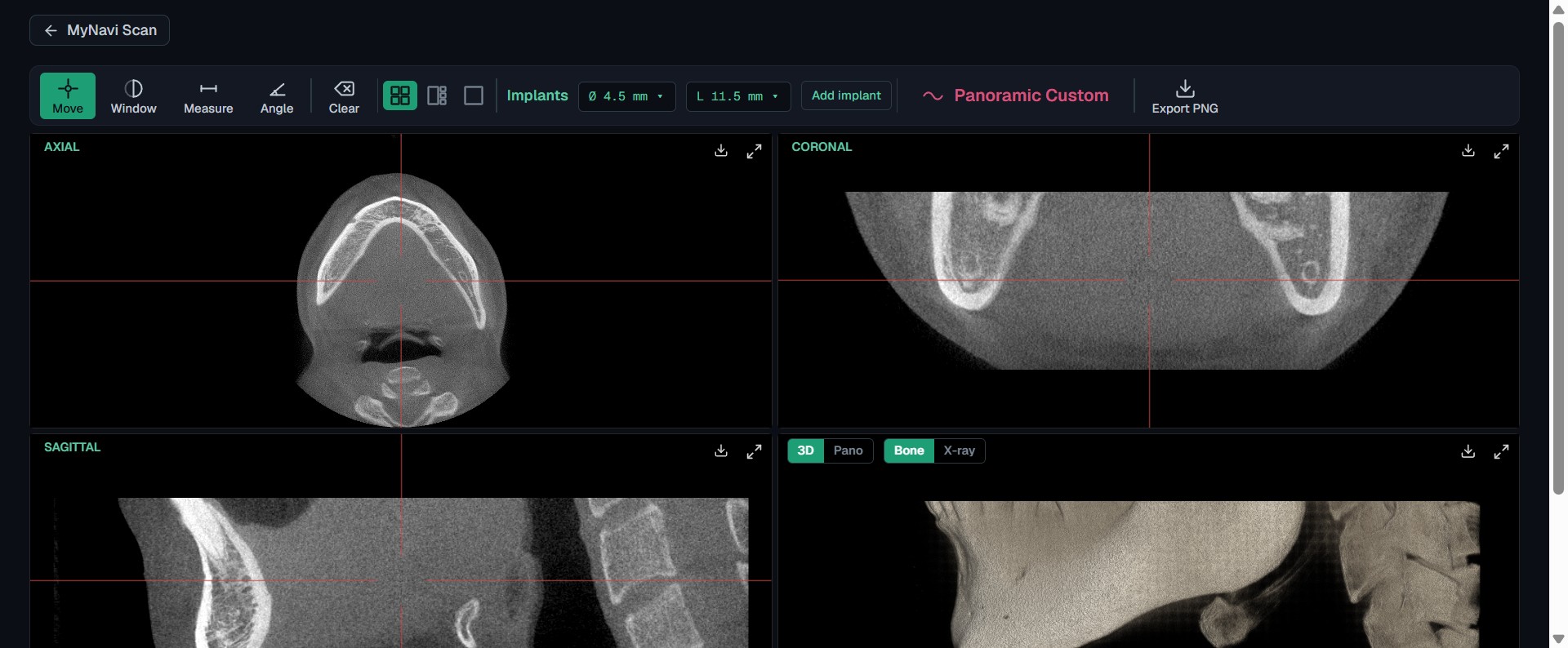
MyNavi CBCT viewer showing axial, coronal and sagittal MPR slices with a 3D volume render of a dental cone-beam CT scan, running in a web browser
Multiplanar reconstruction (axial · coronal · sagittal) and a live 3D volume render of a CBCT scan — in the browser.
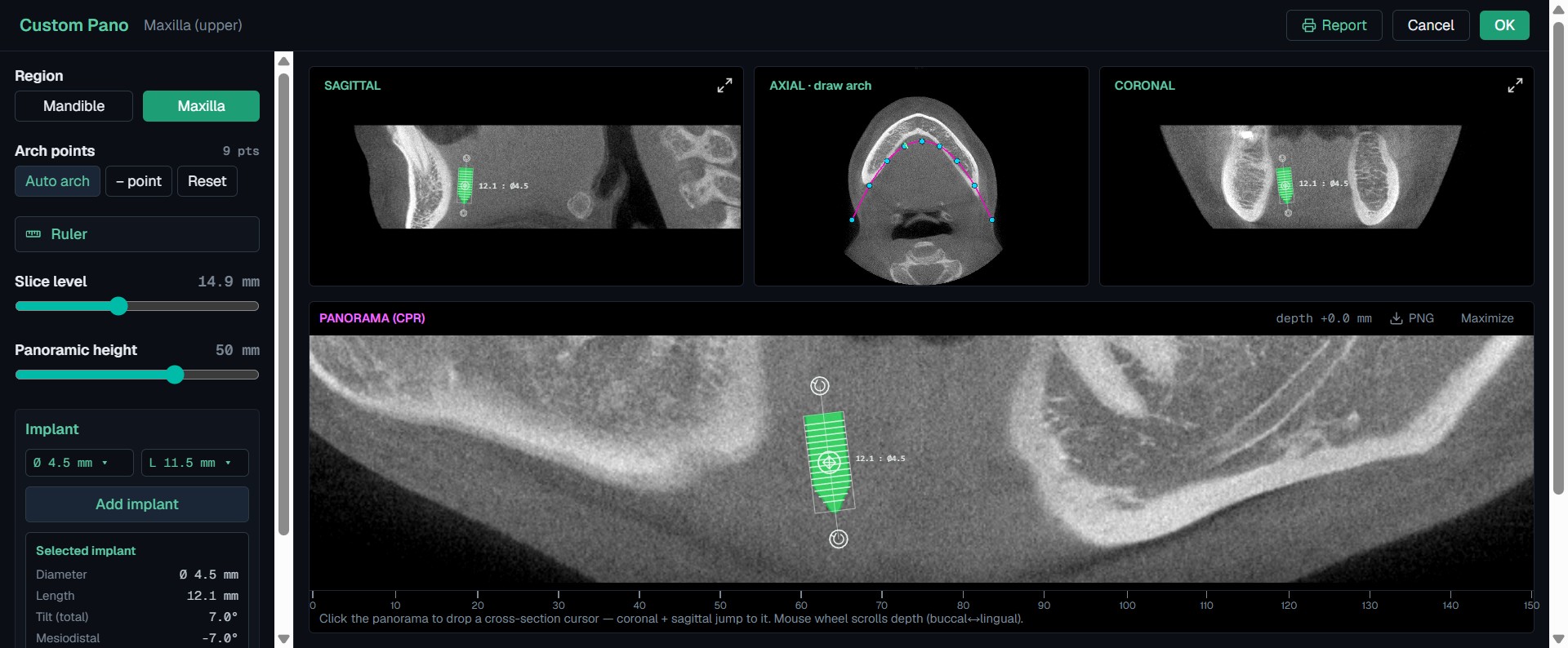
Dental implant planning in the MyNavi CBCT viewer — a virtual 4.5 mm implant placed on a panoramic (CPR) reconstruction with millimetre measurements and cross-section slices
Custom Pano workspace: a virtual implant placed on the panoramic reconstruction with true-millimetre diameter, length and tilt.

Free CBCT viewer — frequently asked questions

Is the MyNavi CBCT viewer really free?
Yes. The MyNavi CBCT / DICOM viewer is 100% free to use in your browser. There is no license, no subscription, no account, and no trial limit — open your cone-beam CT scan and start reviewing it immediately.
Do I need to install any software?
No. Unlike RadiAnt, Horos or 3D Slicer, there is nothing to download or install. The viewer runs entirely inside your web browser on Windows, macOS and Linux — just open the page and drop in your scan.
Is my scan uploaded to a server?
No. Your DICOM files are opened and rendered locally in your own browser. The scan never leaves your computer and nothing is uploaded to or stored on any MyNavi server, which keeps patient data private.
What files can I open — DICOM, .dcm, or a ZIP?
You can drop in a folder of DICOM (.dcm) files or the whole .zip archive exactly as it was delivered — no need to unzip it first. The viewer loads the full cone-beam CT volume in seconds.
What can I do in the CBCT viewer?
You get full multiplanar reconstruction (MPR) — axial, coronal and sagittal slices — a 3D volume render with bone and translucent x-ray modes, an automatic panoramic (OPG) view, a Custom Pano workspace with cross-sections, dental implant planning in millimetres, and distance measurements on a calibrated scale.
Can I plan a dental implant in the browser?
Yes. Place an implant with two clicks, drag and rotate it on any slice or in 3D, choose diameter and length, and read the true-millimetre position, tilt and clearances — all directly in the browser, no CAD software required.
Which browsers are supported?
Any modern browser with WebGL — Google Chrome, Microsoft Edge, Firefox and Safari all work. Chrome or Edge on a desktop give the smoothest experience for large full-arch CBCT scans.
Is this a diagnostic device?
No. The MyNavi CBCT viewer is for professional review and planning only — it is not a diagnostic device. Final diagnosis should always be made with validated clinical tools and professional judgement.

[ QUICK START ]

From DICOM to first measurement in 5 minutes.

01

Open the email.

We send a one-time link to the encrypted DICOM folder. Download the .zip — no need to extract it.

02

Click “Open Free Viewer”.

The MyNavi CBCT Viewer opens right in your browser. Nothing to download or install, no account to create.

03

Drop the ZIP in.

Drag the .zip (or the DICOM folder) onto the viewer window. It loads in seconds — and never leaves your computer.

04

Start planning.

MPR (axial / coronal / sagittal), 3D volume with bone / X-ray modes, panoramic view, implant placement and calibrated mm measurements — all built in.

READY TO BOOK?

READY TO KEEP YOUR PATIENTS IN YOUR CHAIR?

Book your first scan in under 2 minutes. Free training session included. No commitment. Mobile CBCT scan parked at your Chicago dental clinic.

  • HIPAA Business Associate
  • DICOM in 15 minutes
  • No subscription
  • 312-999-0550